
Just Print This Once
Working on Vacation?
Like every summer, we’re lucky enough to spend time at the family cabin. The downside: LTE hotspot is my best wifi. Excited to play with his cousins, my son needed D&D character sheets printed (no wifi, no D&D Beyond). The cabin has an HP LaserJet P1006 from the mid 2010s. The age of Grandma’s laptop (sadly not at the cabin). I download HP’s official driver bundle from their support site. The installer opens.
Requires macOS 15.
We’re now on macOS 26. Eleven OS versions of drift. No supported path forward. I run a similar printer from the late 2000s, using a Pi running CUPS to enable wifi printing on my home network, so I wasn’t new to the open printer project. I sorta figured I could just get an open source driver and print in a few minutes. I was very wrong.
Research over LTE
Once I realized that CUPS didn’t directly have support for this printer, I needed a new way to proceed. I really didn’t want to be doing this: taking time away from family to troubleshoot tech. But I also did want the outcome.
Old workflow: open forty browser tabs, page through HP support, find a forum thread from 2019, watch the spinner choke on LTE bandwidth, only to realize it’s the wrong direction after several ads served.
New workflow: I open Claude and review the problem. We work over tokens. No images, no marketing pages loading sideways, no cookie banners. Text in, text out. Importantly, working in auto mode, so I can trickle my attention to the printing problem, while visiting with family.
The fidelity of the conversation improved without the detritis of the visual web. This is a new affordance and I don’t think people talk about it enough; high-resolution problem solving works better over thin pipes than the old workflow did over fat ones. Claude fans out searches and aggregates the results. That was the part of “research” that used to eat the afternoon.
Things I never knew about printers
The P1006 turns out to be a “winprinter”: a category of laser printer from roughly 2003 to 2012 with almost no onboard intelligence. The host CPU rasterizes everything; the printer is barely more than a mechanism. The driver path is foo2zjs, an open-source rescue mission for hardware that only ever shipped Windows binaries.
Half an hour in I’ve learned something I should have known for fifteen years: a “printer” used to be a small computer. Then for a decade it wasn’t. Then it became one again. PostScript ROM in the 80s. Dumb winprinters in the aughts. ARM SoCs running IPP today. An architectural pendulum I’d been watching the whole time without noticing.
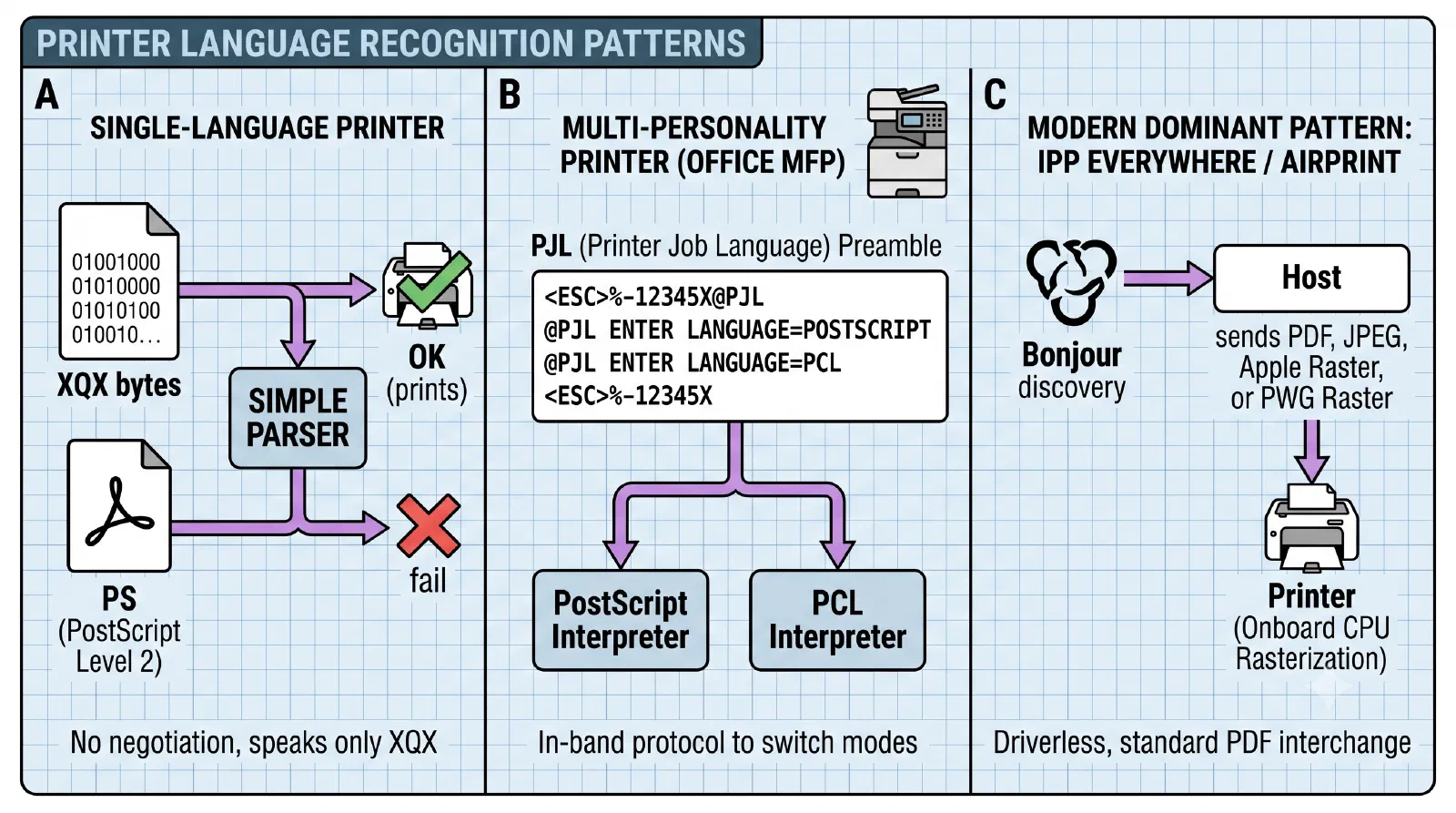
I had Claude patch a Makefile targeting linux to build foo2xqx and decode firmware in macOS. The printer ships its own firmware up from the host every power cycle. I learned how to cycle that from the posix terminal. The amber LED that blinks when I plug it in is the printer literally booting from RAM. I had no idea.
Print this once
Then I hit a wall. Modern macOS ships with sandboxing software called Seatbelt. I know a little about this from looking into it for AI process isolation. Seatbelt looks great for that use case; here I found it working against me. The CUPS sandbox profile hardcodes which directories filter binaries (like foomatic-rip) can execute from. Homebrew paths aren’t on the list. The Sandboxing Off toggle is silently ignored; the sandbox blocks access to the correct executables anyway. Apple’s printing strategy has been narrowing the alternatives for years.
Things started to get desperate. I considered bundling Ghostscript into the system filter directory, rewriting dylibs with install_name_tool, moving the printer to a Raspberry Pi. Nope: I didn’t bring hardware on vacation. Each option uglier than the last.
Then I realized I just needed to reframe the problem. I don’t need this printer working forever. I need to print one character sheet, right now, on vacation. Different problem. The raw print queue skips the filter chain entirely because raw jobs don’t need filtering. No sandbox. No dylib rewrite. No Pi server.
Convert PDF to PostScript with gs. Pipe through foo2xqx-wrapper for XQX, the printer’s native format. Send to the raw queue. One bash command, composed by Claude, born out of an afternoon spent deep in printer architecture. The bytes go straight to USB.
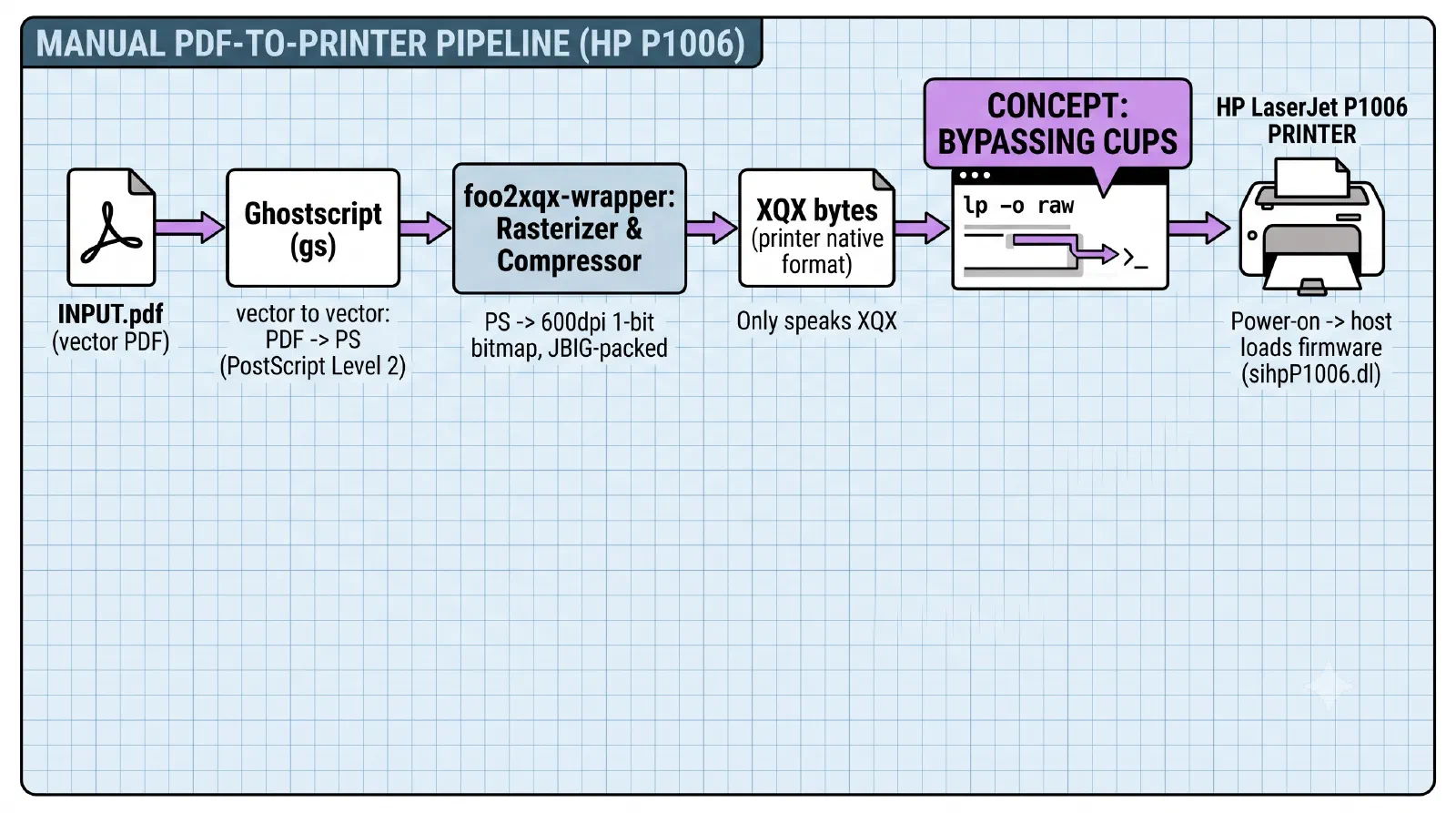
The character sheet prints. The game continues.
Task mode and learning mode
What got me here wasn’t AI solving the problem. It was AI absorbing the grunt work (log parsing, sandbox forensics, archaeology of dead drivers) so I could stay in learning vacation mode while a chore was getting done.
Those two used to be mutually exclusive. The vacation problem demanded task mode: the kind of hyperfocus that pulls you out of recharge. The interesting problem rewarded learning mode. I got both, over LTE, while the kids swam in the lake.
That overlap is new. I think it’s the most underrated thing about working this way.